Free transcription software is not one category.
A local desktop app can transcribe without a monthly quota. A browser tool is faster for one audio file. A meeting assistant can join scheduled calls automatically, but usually stores the result in a cloud workspace. Those are different workflows, even when every product calls itself free.
The short version:
- Choose Anarlog for live, bot-free meeting transcription with local data ownership and no transcription-minute cap.
- Choose MacWhisper for private audio or video file transcription on a Mac.
- Choose Riverside for an occasional browser upload without creating an account.
- Choose Transcript LOL when the source is a URL or cloud file and two short transcripts per day are enough.
- Choose Otter for automatic calendar meetings and a searchable cloud meeting workspace.
- Choose Notta for multilingual cloud transcription, while treating its three-minute free-session limit as an evaluation tier.
Free transcription software compared
| Tool | What is actually free | Best fit | Processing model | Main free limit |
|---|---|---|---|---|
| Anarlog | Unlimited local transcription and BYOK or local AI | Live meetings with local ownership | Local-first desktop app | You provide an AI key or local model for free AI summaries |
| MacWhisper | Unlimited on-device file transcription with smaller local models | Private files on a Mac | Local desktop app | Larger models and meeting recording require Pro |
| Riverside | Unlimited standalone audio and video uploads | One-off browser transcription | Cloud web tool | Free output treats multi-speaker audio as one speaker |
| Transcript LOL | Two transcripts per day, up to 20 minutes each | Short files, cloud drives, and media URLs | Cloud web tool | No summaries or chat on free; one upload at a time |
| Otter | 300 minutes per month | Automatic meeting capture and follow-up | Cloud workspace with bot and bot-free capture options | 30 minutes per conversation and three lifetime file imports |
| Notta | 120 or 200 minutes per month, depending on region | Multilingual cloud transcription | Cloud workspace with bot and desktop capture | Three minutes per conversation |
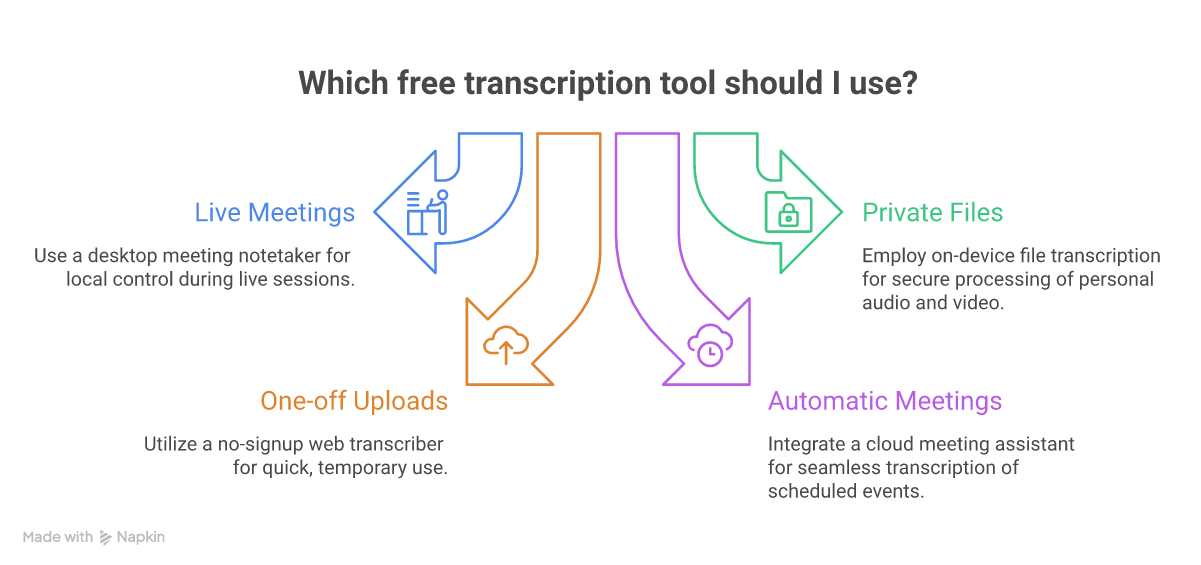
Start with what you need to capture, where you are willing to process it, and whether the free limit survives normal use.
How we evaluated these tools
We used five practical filters:
- The free access is ongoing. A permanent free plan, open-source app, or unlimited free utility qualifies. A short trial does not.
- The limit is explicit. Minutes, file imports, meeting duration, and export restrictions matter more than a large "Free" label.
- The capture method fits the job. Live meetings, uploaded recordings, browser URLs, and manual transcription are different jobs.
- The data path is understandable. Local tools keep processing on your computer by default. Cloud tools require you to evaluate the vendor's current privacy and retention terms.
- The upgrade trigger is honest. We call out the point where a free plan stops being useful instead of hiding it below a feature list.
We checked each vendor's current product, pricing, and privacy pages for this update. Plans still change often, so follow the source links before committing a workflow.
1. Anarlog: best for free live meeting transcription with local control
Anarlog is an open-source AI meeting notetaker for macOS, Windows, and Linux. It captures microphone and system audio from your computer, so no meeting bot needs to join Zoom, Microsoft Teams, Google Meet, or an in-person conversation.
The canonical meeting record lives in local SQLite. Notes, transcripts, and meeting metadata are not dependent on a vendor-hosted workspace, and Markdown is available when you want a portable export.
What the free plan includes
- Unlimited local transcription with no monthly minute quota
- Bot-free capture of microphone and system audio
- Local storage for meetings, notes, and transcripts
- Bring-your-own-key support for AI providers
- Local AI through tools such as Ollama or LM Studio
- Search, templates, imports, and portable exports
- An MIT-licensed codebase that can be audited or forked
The free path is most useful when you already have an API key or are comfortable running a local model for summaries. Local transcription itself does not require a paid Anarlog subscription.
When you would pay
Anarlog Pro is $15 per month or $150 per year when you want hosted transcription and AI, encrypted CloudSync, sharing, and calendar-connected services without configuring your own providers.
2. MacWhisper: best for private audio and video files on Mac
MacWhisper is a native Mac app built around local speech-to-text models. Drop in a recording, record from the microphone, or use its basic dictation mode, and the transcription runs on your Mac by default.
Its free version includes smaller Whisper models, more than 100 languages, and TXT, SRT, and VTT export. Because the audio stays on the device when you use local models, it is a strong fit for interviews, lectures, and recordings you do not want to upload to a browser service. MacWhisper's privacy documentation explains the exceptions: cloud transcription, translation, or AI providers receive data when you explicitly use those services.
What the free version includes
- Unlimited local file transcription
- Tiny, Base, and Small Whisper models
- Microphone recording and basic dictation
- TXT, SRT, and VTT export
- Local processing on macOS
When you would pay
MacWhisper Pro is a one-time purchase through the official site. It adds larger and faster models, batch transcription, advanced exports, automatic speaker recognition, meeting recording, real-time captions, and more AI-provider integrations. The Gumroad and Mac App Store editions have different licenses and pricing, so buy through MacWhisper's official site rather than a lookalike domain.
3. Riverside: best for a one-off transcript without signup
Riverside's standalone transcriber accepts audio or video in a browser and does not require an account. Riverside says the utility is free to use without a transcription quota, supports more than 100 languages, and exports TXT or SRT.
That makes it the lowest-friction option in this list for a single non-sensitive file. Upload, wait for the transcript, download it, and leave.
The trade-off is context. This is a cloud upload, not an on-device workflow. The free standalone tool also assigns all text in a multi-speaker file to one speaker. Riverside's paid recording platform adds speaker detection, editing, captions, and the rest of its creator workflow.
Riverside's privacy policy treats recordings and transcripts as Content Data and describes how that data may be used to provide and improve the service. Read the current policy before uploading confidential interviews or meetings.
4. Transcript LOL: best for short files and media URLs
Transcript LOL is a cloud transcription tool designed around flexible input. It accepts files, cloud drives, and links from media platforms. Its free tier allows two transcripts per day, each up to 20 minutes, with TXT, DOCX, PDF, SRT, and VTT exports.
That daily reset can be more useful than a one-time trial. It works well for short clips, voice notes, and individual podcast or video segments. It is less useful for full-length interviews because the 20-minute limit applies to every free upload.
What the free plan includes
- Two transcripts per day
- Up to 20 minutes per transcript
- One upload processed at a time
- File, cloud-drive, and supported URL inputs
- Speaker detection
- TXT, DOCX, PDF, SRT, and VTT export
Summaries, custom prompts, chat, longer files, and priority processing require the paid plan. Transcript LOL says in its privacy policy that it does not use customer content to train AI models, but the files are still processed through a cloud service.
5. Otter: best for automatic meeting capture on a free plan
Otter is no longer positioned as a simple transcriber. It describes itself as a conversational knowledge engine that turns meetings into a searchable workspace and pushes the output into other tools.
Its Basic plan includes 300 transcription minutes per month, with a 30-minute cap per conversation. Otter Notetaker can join Zoom, Google Meet, and Microsoft Teams as a participant. Otter also offers bot-free recording through desktop, mobile, and browser capture paths, so the bot is an option rather than the only workflow.
What the free plan includes
- 300 transcription minutes per month
- Unlimited meetings, up to 30 minutes per conversation
- Three audio or video file imports for the lifetime of the account
- The 25 most recent conversations in history
- Speaker identification, editable text, playback, and basic AI Chat
- TXT and MP3 export
The free plan is generous for short recurring calls but poor for a backlog of recordings because file imports are limited to three for the life of the account. PDF, DOCX, SRT, longer meetings, more imports, and deeper workflow features require a paid plan. Verify the current numbers on Otter's pricing page.
Otter is a cloud workspace. Its privacy policy describes using de-identified audio recordings and transcriptions to improve and train its proprietary AI technology. If that boundary does not fit your meeting, use a local workflow instead.
6. Notta: best for testing multilingual cloud transcription
Notta combines real-time transcription, meeting bots, a desktop app, mobile capture, file uploads, translation, and post-meeting AI deliverables. Its clearest advantage is language breadth: Notta currently advertises transcription in 58 languages and supports several bilingual and translation workflows on paid plans.
The free tier looks larger in minutes than it feels in use. Notta's public pages show different monthly allowances by region, including 120 and 200 minutes, but each free conversation stops at three minutes. That is enough to test quality on your own accent and audio setup. It is not enough for a normal meeting or interview.
What the free plan includes
- A monthly transcription allowance, with regional variation
- Three minutes per conversation
- Up to 50 file uploads per month
- A limited number of AI summaries
- Real-time transcription, mobile apps, and speaker identification
Paid plans raise the recording duration, add transcript export and translation capabilities, and expand collaboration and integrations. Check Notta's pricing page because the regional free allowance and paid pricing can differ.
Tools we did not count as genuinely free automatic transcription
Some useful products do not fit this list:
- oTranscribe is free and open source, but it is a manual transcription workspace. It helps you type while controlling playback; it does not automatically convert speech to text.
- Rev, Sonix, Trint, and Happy Scribe offer trials or small introductory allowances, but the automatic transcription workflow becomes paid after the trial or starter credit.
- OpenAI Whisper is open source and free to run, but it is a model rather than a ready-made end-user workflow. If you are comfortable with a command line, it remains a strong building block. MacWhisper and other desktop apps package that kind of local model into a usable interface.
A free trial can still be the right answer for one critical file. It simply should not be confused with software you can keep using every week without paying.
Which free transcription tool should you choose?
Use the input and privacy boundary to decide:
- Live meetings, local record: Anarlog
- Private files on Mac: MacWhisper
- One quick browser upload: Riverside
- Short online media or cloud files: Transcript LOL
- Automatic scheduled meetings: Otter
- Multilingual cloud evaluation: Notta
For sensitive material, do not stop at a product's marketing page. Confirm consent requirements, the exact capture path, enabled AI providers, retention settings, and the current privacy agreement for every service that receives the audio.
Frequently asked questions
Is there completely free transcription software?
Yes. Anarlog provides unlimited local meeting transcription, MacWhisper provides unlimited local file transcription on Mac, and Riverside offers a free standalone browser transcriber. The catch differs: local apps need your computer to run the model, while a browser tool requires uploading the file to a cloud service.
What is the best free transcribing software for Mac?
Use MacWhisper for existing audio and video files. Use Anarlog for live meetings, system audio, notes, and a searchable local meeting history. Both offer ongoing local transcription without a monthly minute bucket, but they solve different jobs.
Can I transcribe audio for free without uploading it?
Yes. Use an on-device tool such as MacWhisper, or use Anarlog for live meetings and imported recordings. Keep the speech-to-text model and any summary model local if the audio must not leave your computer.
Which free transcription software works for meetings?
Anarlog captures meetings from your desktop without a bot. Otter can automatically join scheduled meetings or record through its desktop and browser tools. Notta also supports meeting bots and desktop capture, but its free three-minute conversation limit makes it better for testing than routine meetings.
Are free transcription tools accurate?
Accuracy depends more on the recording than the price label. Clear audio, separate microphones, limited crosstalk, and the right language model matter. Treat vendor percentage claims as marketing unless they publish a reproducible benchmark. Test the tool with your own speakers, accents, terminology, and worst normal audio before building a workflow around it.